Architecture Overview
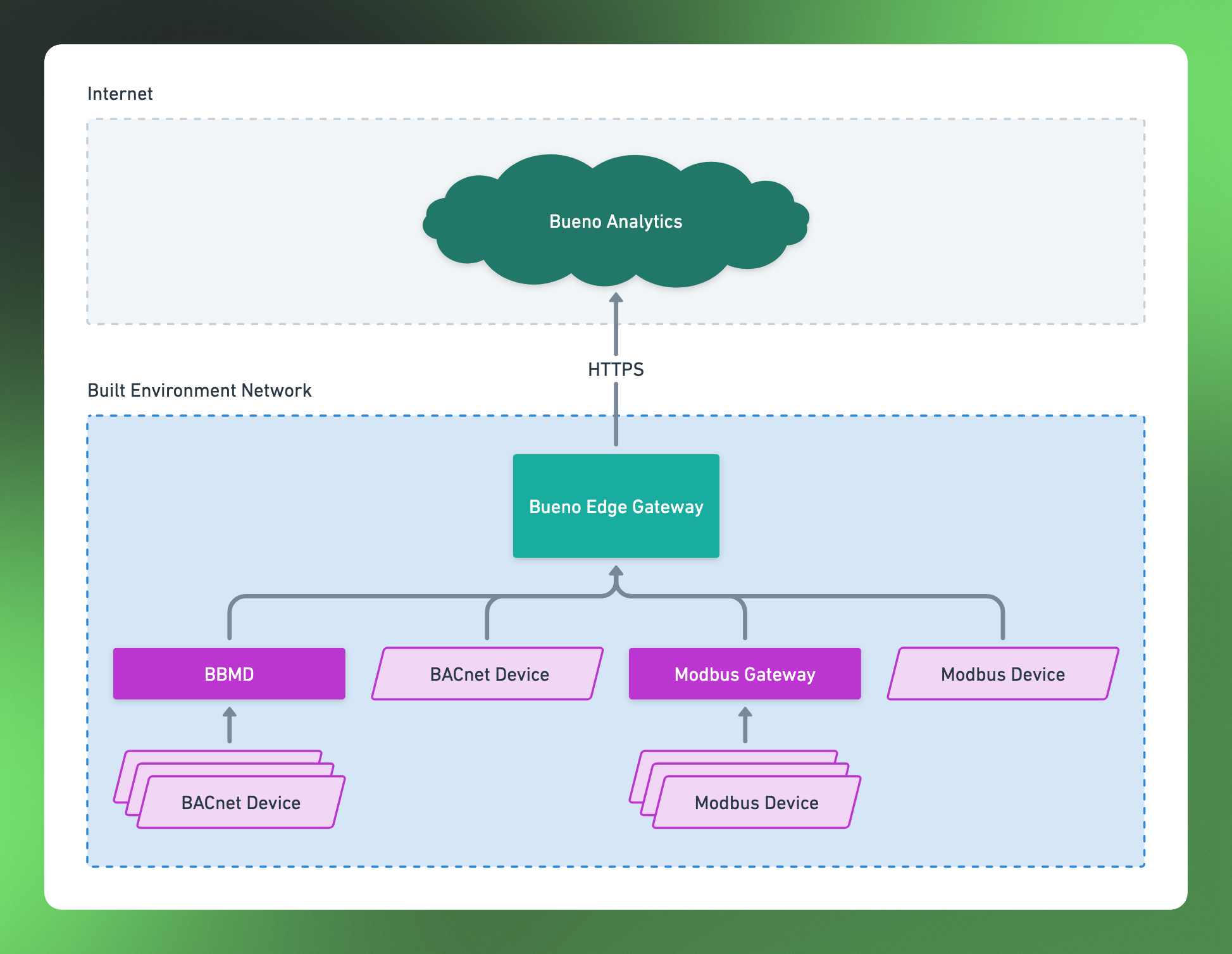
The BEG is containerized software run with Docker, specifically Docker Compose is used to orchestrate the multiple components that make up the complete software product. It is designed to be deployed on "Edge Devices" connected to the networks in the built environment from which data needs to be extracted. This allows the software to scan and poll these networks for data using whatever protocol is appropriate for that specific network, and publish that data to the Bueno Platform via an HTTPS link.
Update Process
The BEG software is auto-updating, connecting regularly to Bueno servers in the cloud to pull down the latest updates. Note that this does not include OS updates and security patches which are the purview of the owner/operator of the device the software is running on.
System Requirements
The BEG is designed and tested to run on edge devices with the following characteristics:
- Running an Ubuntu OS, version 22.04 or greater. Other Linux distributions, Windows, and macOS are not supported.
- A minimum of 8 GB of memory. Large sites with a large number of data points (>10,000) may need more.
- At least 32 GB of disk space.
- CPU equivalent to a quad core @ 1.5 GHz or better. Large sites with a large number of data points (>10,000) may need more. Both x86 and ARMv8 architectures are supported.
Whilst we do not explicitly recommend hardware for our BEG software, it has been proven to run successfully on the following list of devices:
- OnLogic CL250 (for small to medium sized sites)
- OnLogic ML100G-41 (for medium to large sites)
(Please note both of the device above are fan-less and can run very hot. Care should be taken to install them in a place where they have access to good airflow and away from heat sensitive materials. If high temperatures aren't tolerable, consider hardware with active cooling, i.e. a fan.)
Limitations
The BEG is designed to harvest data from up to 100,000 points. For deployments with greater than 100,000 points it is recommended that other options are explored to ensure a reliable, maintainable deployment. (This can include deploying multiple BEGs, each responsible for fewer than 100,000 points. However, careful planning and an understanding of the local network(s) is required to execute this properly.)
Connectivity (Firewall) Requirements
To install and run the BEG software, internet access is required. If your device is running behind a firewall that restricts outbound traffic to the internet, the firewall must at least allow HTTP (port 80) and HTTPS (port 443) access to the domains implied by the following glob patterns:
- *.bueno-analytics.com
- *.docker.io
- *.docker.com
- *.ubuntu.com
- registry.npmjs.org
- ppa.launchpad.net
Note: If firewall administrators are unwilling to allow HTTP traffic on port 80, it is possible for the BEG software to run without access to a HTTP connection, (the software is designed to operate purely over HTTPS). However, Ubuntu OS package managers are not designed to operate purely over HTTPS and this may cause issues during the BEG software installation and when performing general device updates or maintenance of the Ubuntu OS (completely unrelated to the BEG software). You may need HTTP traffic to be allowed specifically when you are conducting those operations.