System Overview
Once the Bueno Edge Gateway (BEG) software has been installed, it can be accessed at http://localhost:3000. By default, you will be directed to the BEG's Summary page which provides a detailed overview of the state of play. This document details exactly what all of this information means.
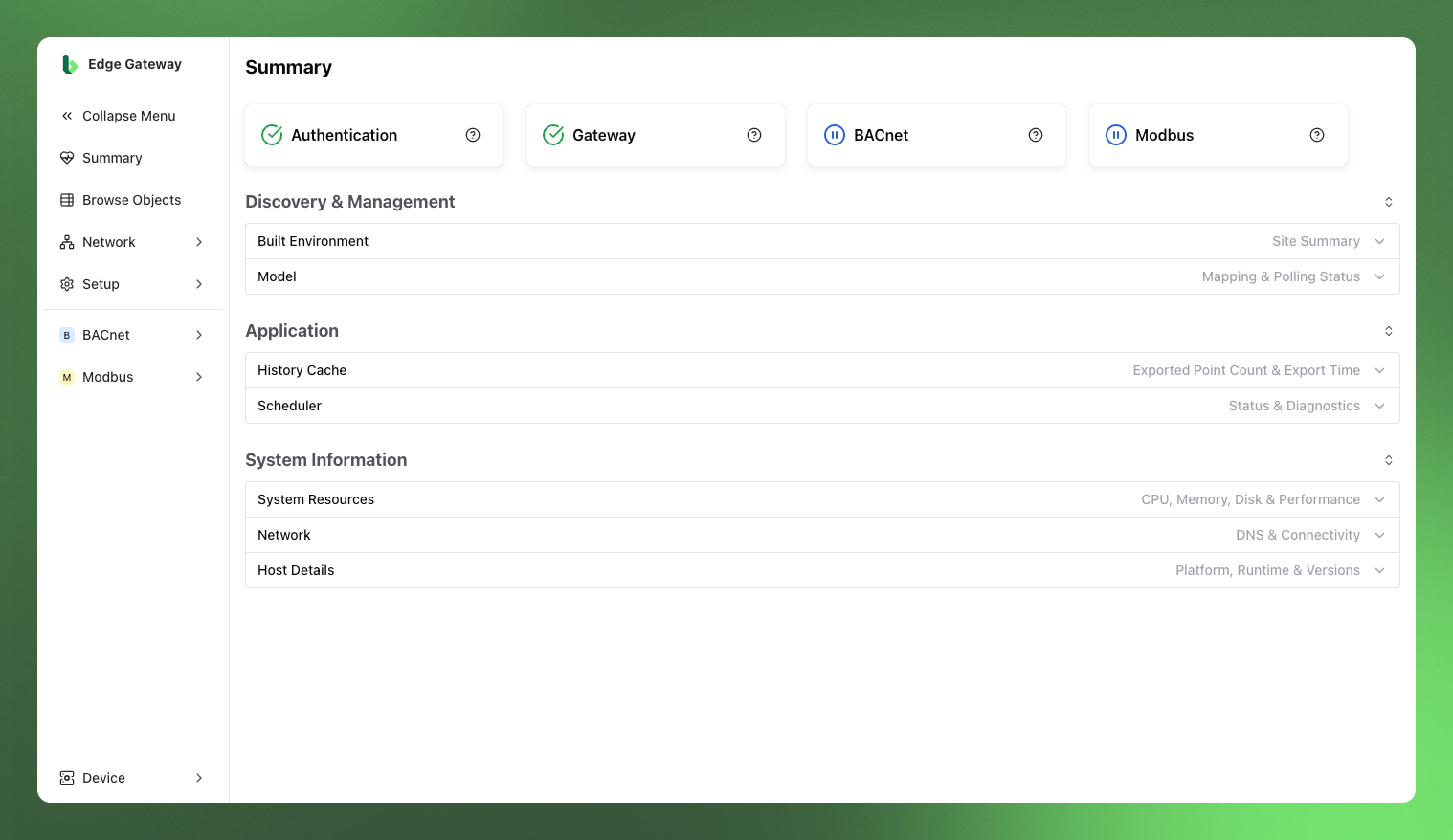
High-Level Status Indicators
At the top of the page are four high-level status indicators:
- Authentication: Indicates whether or not the BEG is successfully authenticated with the Bueno platform in the cloud (using the credentials created during the install).
- Gateway: Indicates whether the BEG has successfully been onboarded into the Bueno platform and is ready to start exporting data.
- BACnet: Indicates whether a BACnet connection has been successfully configured and the BEG is able to export data from BACnet networks to the Bueno platform.
- Modbus: Indicates whether a Modbus connection has been successfully configured and the BEG is able to export data from Modbus networks to the Bueno platform.
Discovery & Management
This subsection shows how the points discovered on local networks map to Data Streams in the Bueno platform.
Built Environment
| Discovery | Description |
|---|---|
| BACnet Points | The number of BACnet points discovered on the local network(s). |
| Modbus Points | The number of Modbus points discovered on the local network(s). (In this context, a Modbus point could also be considered the same as a single registry of a Modbus Device) |
Model
| Status | Description |
|---|---|
| Total | Total number of BEG points that have been published to the Bueno platform as Data Streams. |
| Mapped | Total number of published Data Streams that have been mapped in the Bueno platform. Mapped Data Streams are eligible for polling. |
| BACnet | Total number of BACnet points that have been published to the Bueno platform as Data Streams. Only shown if a BACnet Cloud Connection has been configured. |
| Modbus | Total number of Modbus points that have been published to the Bueno platform as Data Streams. Only shown if a Modbus Cloud Connection has been configured. |
It is also possible to Publish Data Streams and Apply Default Polling from this part of the BEG app, for which further documentation exists here.
It typically makes sense to publish points as Data Streams first, complete the mapping process in the Bueno platform, and then return to apply polling. Only mapped Data Streams are eligible for polling.
Application
Provides an overview of the BEG's job scheduling and the statuses of these jobs, particularly details pertaining to the export of historical data to the Bueno platform.
History Cache
| Points | Description |
|---|---|
| Exported Points | The number of points whose historical data has been exported to the Bueno platform. |
| Latest Timestamp | Most recent piece of history data that has been exported to the Bueno platform, across all points. |
Scheduler
Current Status
| Property | Description |
|---|---|
| Status | The state (Enabled or Disabled) of the job scheduler. |
| Job Count | The all-time total number of jobs run, running, or set to run. |
| Last Boot | The time at which the job scheduler was last started or restarted. |
| Watch Task | The state of the watch task job. This job is responsible for starting and stopping all other jobs. Its normal state is Running. |
Diagnostics
| Property | Description |
|---|---|
| BACnet Export | The state of the history export of BACnet points to the Bueno platform as well as the time that export job was first scheduled. |
| Modbus Export | The state of the history export of Modbus points to the Bueno platform as well as the time that export job was first scheduled. |
System Information
Contains a variety of information about the system the BEG app is running on.
System Resources
CPU
| Property | Description |
|---|---|
| CPU Cores | Total number of usable CPU cores. |
| CPU Load Avg | Average number of processes waiting to run over 1 and 5 minutes. Values less than the total number of CPU cores indicate healthy load. |
Memory
| Property | Description |
|---|---|
| App Memory | Total memory used by the BEG application. |
| App Heap | The total heap memory used by the BEG application and the total memory reserved for the heap. |
| Total Memory | Total system memory reported by the OS. |
Disk
| Property | Description |
|---|---|
| Disk Usage | Total system disk space used and total capacity of the filesystem. |
Network
DNS Configuration
| Property | Description |
|---|---|
| Test Domain | Domain with which DNS testing is conducted. (i.e. the domain to be resolved by the DNS test.) |
| Status | Status of the DNS configuration (based on whether the Test Domain was successfully resolved by the DNS test.) |
| Latency | Latency of connection to DNS server. |
| DNS Servers | Addresses of the configured DNS servers for the host system. |
Host Details
Platform
| Property | Description |
|---|---|
| Hostname | The host name of the system the BEG app is running on. |
| Platform | Name of the platform the BEG app is running on. |
Runtime
| Property | Description |
|---|---|
| Container | Indicates whether the BEG app is running in a containerised environment. |
| Host Uptime | The time the host system (on which the BEG app runs) has been up for (since its last start). |
| App Uptime | The time the BEG application has been running for (since its last start). |
Versions
| Property | Description |
|---|---|
| Node.js | Version of Node.js the BEG app is running on. |
| V8 | Version of the V8 JavaScript engine the BEG app is running on. |
| OpenSSL | Version of OpenSSL in use. |
| App | Version of the BEG app itself. |
| Build Date | The date the current version of the BEG app was built. |